
Bảng tra cứu nhanh về quan hệ Eloquent
Quan hệ một-một
Định nghĩa nghiệp vụ: Người dùng có giỏ hàng.
Định nghĩa của lập trình viên: User có một ShoppingCart. ShoppingCart thuộc về một User.
Sơ đồ
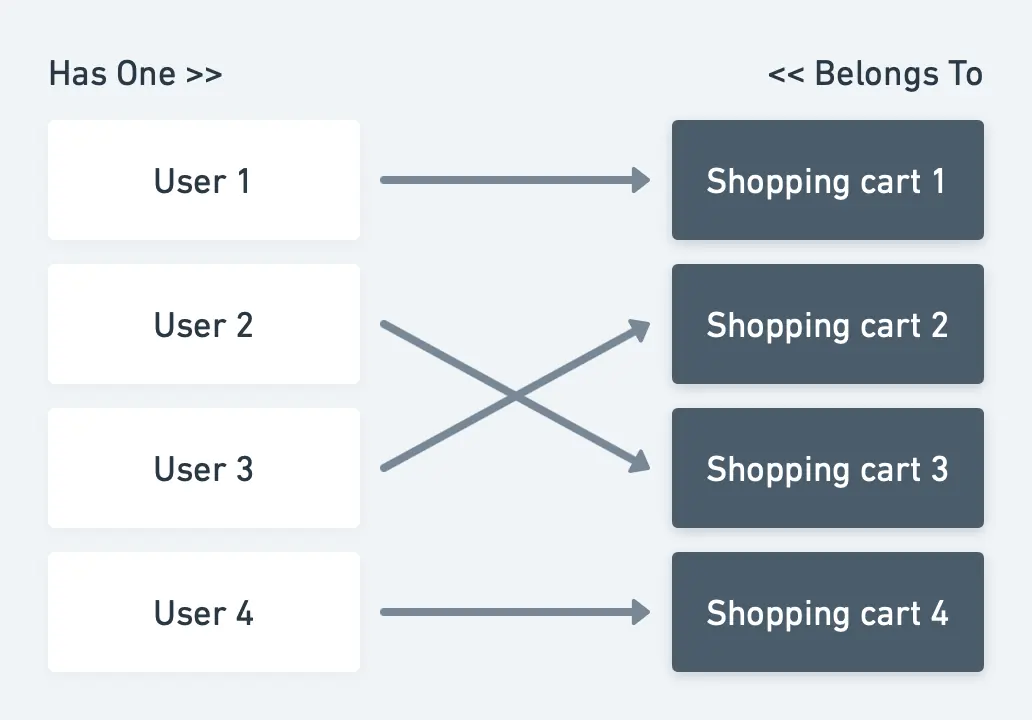 Giải thích quan hệ:
Bảng ShoppingCart cần lưu ID của user.
Giải thích quan hệ:
Bảng ShoppingCart cần lưu ID của user.
Các model: Vậy chúng ta cần hai model: User và ShoppingCart. Các model này sẽ được viết với đoạn code sau:
class User{
  /*
   * This function defines a relation with Shopping Cart and tells that ID is stored in
   * ShoppingCart model
   */
  public function shoppingCart()
  {
    return $this->hasOne(ShoppingCart::class);
  }
}
class ShoppingCart{
  /*
   * This function defines a relation with the User and tells that ID is stored in
   * this model
   */
  public function user()
  {
    return $this->belongsTo(User::class);
  }
}
Migration cơ sở dữ liệu:
Schema::create('users', function (Blueprint $table) {
  $table->id();
  # Some more columns which you will need
});
Schema::create('shopping_carts', function (Blueprint $table) {
  $table->increments('id');
  # Some more columns which you will need
  $table->integer('user_id')->unsigned()->index()->nullable();
  $table->foreign('user_id')->references('id')->on('users');
});
Lưu bản ghi: Để tạo quan hệ giữa User và ShoppingCart.
$user->shoppingCart()->save($shoppingCart);
Để tạo quan hệ giữa ShoppingCart và User.
$shoppingCart->user()->associate($user)->save();
Quan hệ một-nhiều
Định nghĩa nghiệp vụ: Người dùng phải có thể thêm nhiều sản phẩm vào giỏ hàng.
Định nghĩa của lập trình viên: ShoppingCart có nhiều Item.
Sơ đồ
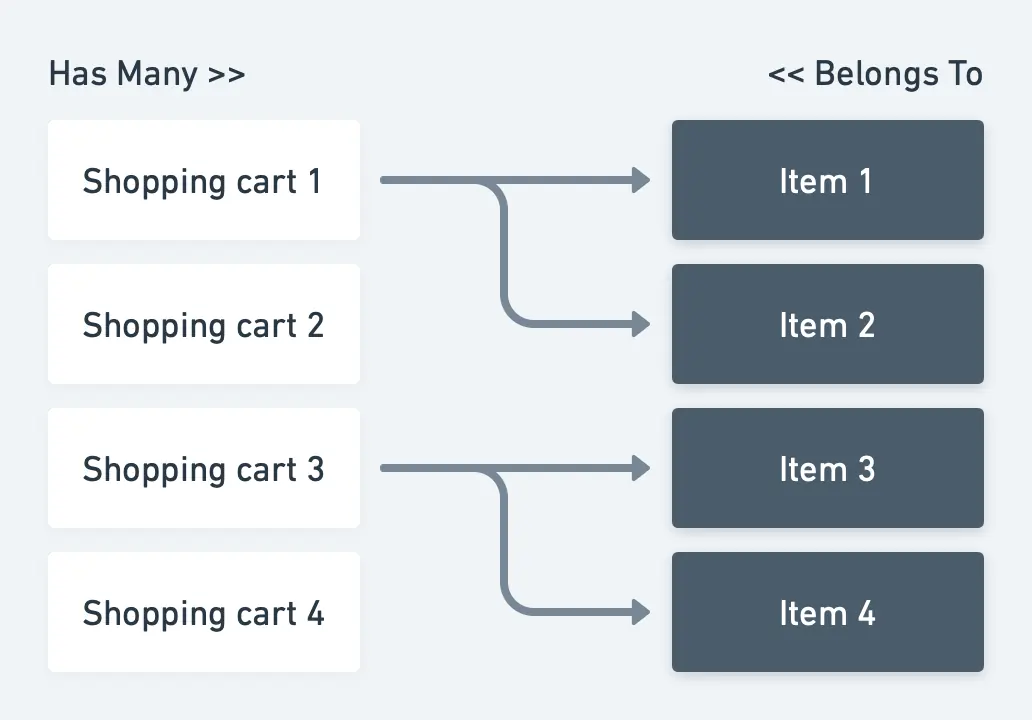
Giải thích quan hệ: Bảng Item cần lưu ID của ShoppingCart.
Các model: Vậy chúng ta cần hai model: ShoppingCart và Item. Các model này sẽ được viết với đoạn code sau:
class ShoppingCart{
  /*
   * This function defines a relation with Item and tells that ID is stored in
   * Item model
   */
  public function items()
  {
    return $this->hasMany(Item::class);
  }
}
class Item{
  /*
   * This function defines a relation with Shopping Cart and tells that ID is stored in
   * this model
   */
  public function shoppingCart()
  {
    return $this->belongsTo(ShoppingCart::class);
  }
}
Migration cơ sở dữ liệu:
Schema::create('shopping_carts', function (Blueprint $table) {
  $table->id();
  # Some more columns which you will need
});
Schema::create('items', function (Blueprint $table) {
  $table->increments('id');
  # Some more columns which you will need
  $table->integer('user_id')->unsigned()->index()->nullable();
  $table->foreign('user_id')->references('id')->on('users');
});
Lưu bản ghi: Để tạo quan hệ giữa ShoppingCart và các Item.
// Create multiple relations between Thief and Car.
$shoppingCart->items()->saveMany([$item1,$item2]);

// Or use the save() function for single model.
$shoppingCart-> items()->save($item1);
Để tạo quan hệ giữa Item và ShoppingCart.
$item->shoppingCart()->associate($shoppingCart)->save();
Quan hệ đa hình một-nhiều
Định nghĩa nghiệp vụ: Người dùng có thể để lại nhiều tin nhắn. Bộ phận hỗ trợ có thể để lại nhiều tin nhắn.
Định nghĩa của lập trình viên: User có nhiều message. Support có nhiều message. Message có thể thuộc về user hoặc support.
Sơ đồ
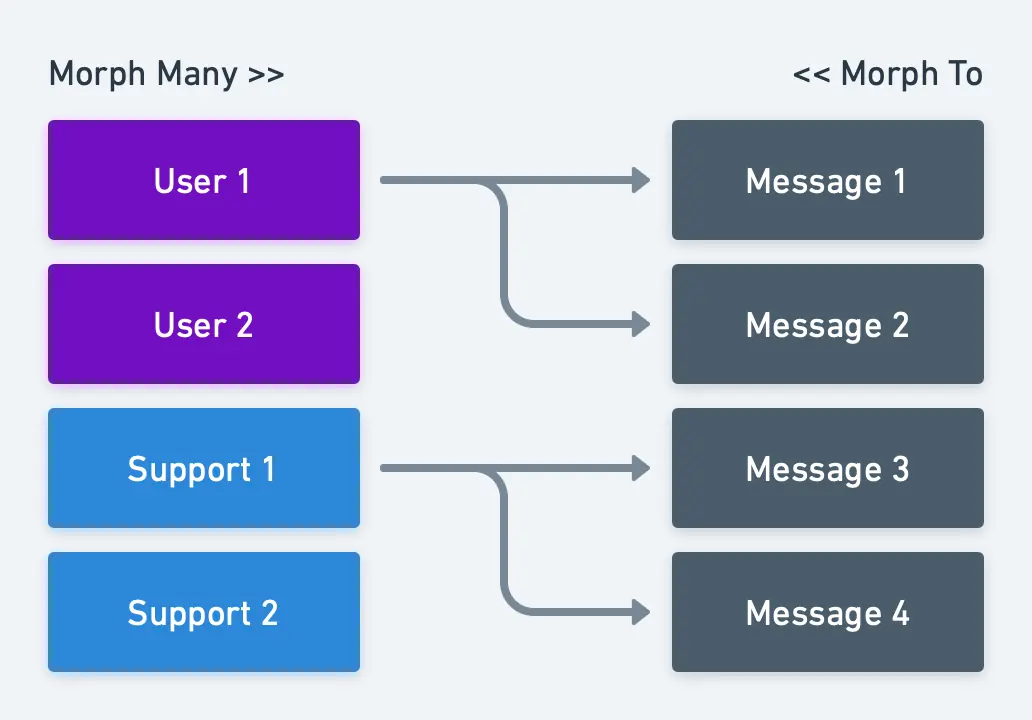
Giải thích quan hệ: Bảng Message cần lưu ID và loại của người gửi message.
Các model: Vậy chúng ta cần ba model: User, Support và Message. Các model này sẽ được viết với đoạn code sau:
class User{
  /*
   * This function defines a relation with Message and tells that ID and type is stored in
   * Message model
   */
  public function messages()
  {
    return $this-> morphMany(Message::class, 'sender');
  }
}
class Support{
  /*
   * This function defines a relation with the Message and tells that ID is stored in
   * Message model
   */
  public function messages()
  {
    return $this-> morphMany(Message::class, 'sender');
  }
}
class Message{
  /*
   * This function defines a relation and tells that ID and type is stored in Message model
   */
  public function sender()
  {
    return $this->morphTo();
  }
}
Migration cơ sở dữ liệu:
Schema::create('users', function (Blueprint $table) {
  $table->id();
  # Some more columns which you will need
});
Schema::create('supports', function (Blueprint $table) {
  $table->id();
  # Some more columns which you will need
});
Schema::create('messages', function (Blueprint $table) {
  $table->id();
  # Some more columns which you will need
  $table->integer('sender_id')->unsigned()->index()->nullable();
  $table->string('sender_type')->nullable();
  // or use $table->morphs('sender'); instead of "sender_id" and "sender_type"
});
Lưu bản ghi: Tạo quan hệ giữa người gửi (User/Support) và Message.
// Create multiple relations.
$user->messages()->saveMany([$message1,$message2]);
$support->messages()->saveMany([$message1,$message2]);

// Or use the save() function for single model.
$user->messages()->save($message);
$support->messages()->save($message);
Để tạo quan hệ giữa Message và người gửi.
$message->sender()->associate($user)->save();
$message-> sender()->associate($support)->save();
Quan hệ nhiều-nhiều
Định nghĩa nghiệp vụ: Một sản phẩm có thể có nhiều thẻ (tag).
Định nghĩa của lập trình viên: Item có nhiều tag. Tag có nhiều item.
Sơ đồ
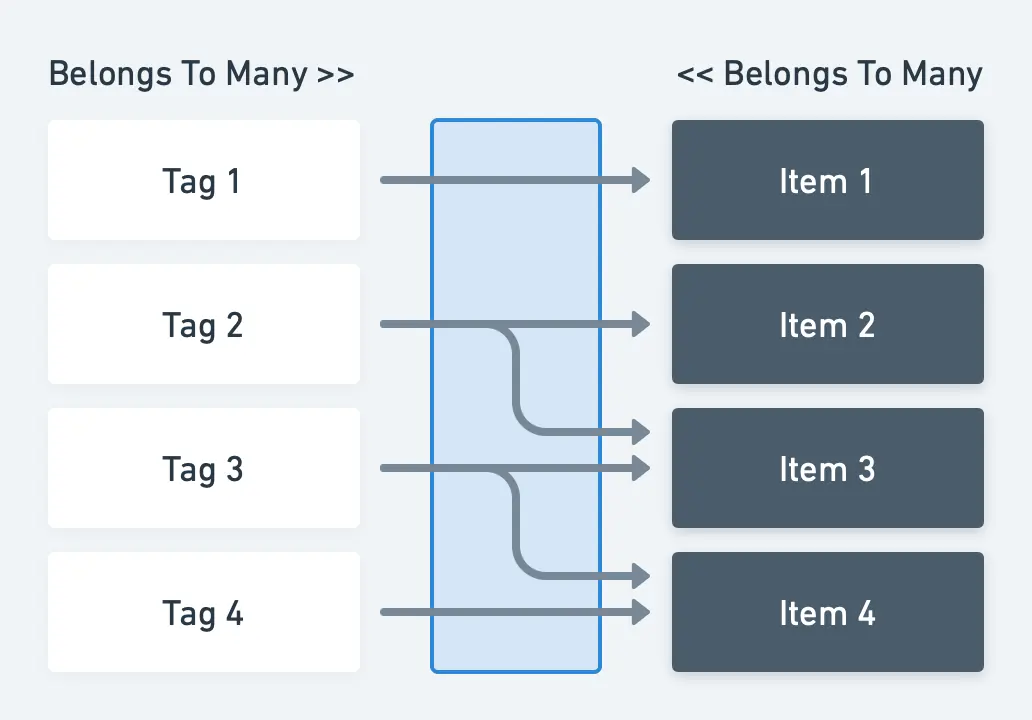
Giải thích quan hệ: Vì một tag có thể thuộc về nhiều item, và một item có thể có nhiều tag, chúng ta cần một bảng thứ ba (gọi là bảng Pivot) để liệt kê quan hệ giữa hai model này.
Các model: Vậy chúng ta cần hai model: Tag và Item. Các model này sẽ được viết với đoạn code sau:
class Tag{
  public function items()
  {
    return $this->belongsToMany(Items::class);
  }
}
class Item{
  public function tags()
  {
    return $this->belongsToMany(Tag::class);
  }
}
Migration cơ sở dữ liệu:
Schema::create('items', function (Blueprint $table) {
  $table->id();
  # Some more columns which you will need
});
Schema::create('tags', function (Blueprint $table) {
  $table->id();
  # Some more columns which you will need
});
Schema::create('item_tag', function (Blueprint $table) {
  $table->id();
  $table->integer('item_id')->unsigned()->index();
  $table->foreign('item_id')->references('id')->on('items')->onDelete('cascade');
  $table->integer('tag_id')->unsigned()->index();
  $table->foreign('tag_id')->references('id')->on('tags')->onDelete('cascade');
});
Lưu bản ghi: Tạo quan hệ giữa Item và Tag
$item->tags()->attach([$tag1->id,$tag2->id]);

// Or use the sync() function to prevent duplicated relations.
$item->tags()->sync([$tag1->id,$tag2->id]);
Hoặc tạo quan hệ giữa Tag và Item
$tag->items()->attach([$item1->id,$item2->id]);

// Or use the sync() function to prevent duplicated relations.
$tag->items()->sync([$item1->id,$item2->id]);
Quan hệ đa hình nhiều-nhiều
Định nghĩa nghiệp vụ: Sản phẩm và bài viết có nhiều thẻ (tag)
Định nghĩa của lập trình viên: Product có nhiều Tag. Post có nhiều tag. Tag có thể được nhiều tagable (Product và Post) sử dụng
Sơ đồ
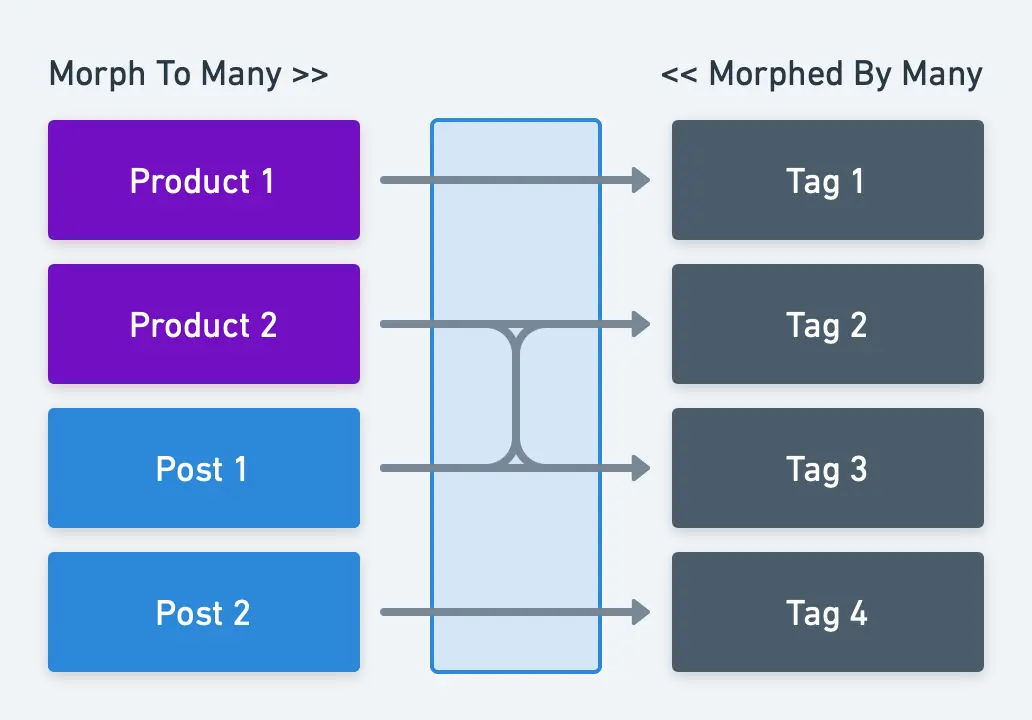
Giải thích quan hệ: Vì một tag có thể thuộc về nhiều post hoặc product, và một product hoặc post có thể có nhiều tag, chúng ta cần một bảng thứ ba (gọi là bảng Pivot) để liệt kê quan hệ giữa các model này.
Các model: Vậy chúng ta cần ba model: Product, Post và Tag. Các model này sẽ được viết với đoạn code sau:
class Product{
  public function tags()
  {
    return $this->morphToMany(Tag::class, 'tagable');
  }
}
class Post{
  public function tags()
  {
    return $this->morphToMany(Tag::class, 'tagable');
  }
}
class Tag{
  public function products()
  {
    return $this->morphedByMany(Product::class, 'tagable');
  }

  public function posts()
  {
    return $this->morphedByMany(Post::class, 'tagable');
  }
}
Migration cơ sở dữ liệu:
Schema::create('products', function (Blueprint $table) {
  $table->id();
  # Some more columns which you will need
});
Schema::create('posts', function (Blueprint $table) {
  $table->id();
  # Some more columns which you will need
});
Schema::create('tagables', function (Blueprint $table) {
  $table->id();
  $table->integer('tagable_id')->unsigned()->index();
  $table->string('tagable_type');
  // or use $table->morphs(‘tagable’); instead of "tagable_id" and "tagable_type"

  $table->integer('tag_id')->unsigned()->index();
  $table->foreign('tag_id')->references('id')->on('tags')->onDelete('cascade');
});
Lưu bản ghi: Tạo quan hệ giữa tagable (Product hoặc Post) và Tag.
$product->tags()->saveMany([$tag1, $tag2]);
$post->tags()->saveMany([$tag1, $tag2]);

// Or use the save() function for single model.
$product->tags()->save($tag1);
$post->tags()->save($tag1);
Hoặc tạo quan hệ giữa Tag và tagable.
$tag->products()->attach([$product1->id,$product2->id]);
$tag->posts()->attach([$post1->id,$post2->id]);

// Or use the sync() function to prevent duplicated relations.
$tag->products()->sync([$product1->id,$product2->id]);
$tag->posts()->sync([$post1->id,$post2->id]);