
Eloquent-Beziehungen: Spickzettel
Eins-zu-eins-Beziehung
Fachliche Definition: Ein Benutzer hat einen Warenkorb.
Definition aus Entwicklersicht: User hat einen ShoppingCart. ShoppingCart gehört zu einem User.
Diagramm
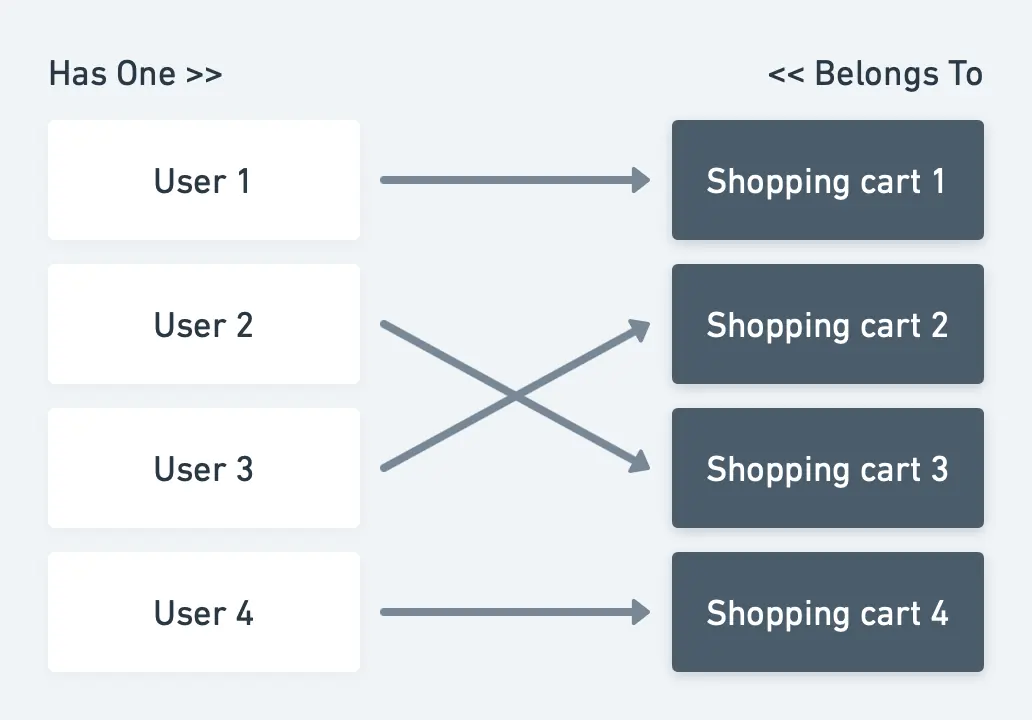 Erklärung der Beziehung:
Die ShoppingCart-Tabelle sollte die User-ID speichern.
Erklärung der Beziehung:
Die ShoppingCart-Tabelle sollte die User-ID speichern.
Modelle: Wir benötigen also zwei Modelle: User und ShoppingCart. Diese Modelle werden mit folgendem Code befüllt:
class User{
  /*
   * This function defines a relation with Shopping Cart and tells that ID is stored in
   * ShoppingCart model
   */
  public function shoppingCart()
  {
    return $this->hasOne(ShoppingCart::class);
  }
}
class ShoppingCart{
  /*
   * This function defines a relation with the User and tells that ID is stored in
   * this model
   */
  public function user()
  {
    return $this->belongsTo(User::class);
  }
}
Datenbankmigration:
Schema::create('users', function (Blueprint $table) {
  $table->id();
  # Some more columns which you will need
});
Schema::create('shopping_carts', function (Blueprint $table) {
  $table->increments('id');
  # Some more columns which you will need
  $table->integer('user_id')->unsigned()->index()->nullable();
  $table->foreign('user_id')->references('id')->on('users');
});
Datensätze speichern: So erstellen Sie eine Beziehung zwischen User und ShoppingCart.
$user->shoppingCart()->save($shoppingCart);
So erstellen Sie eine Beziehung zwischen ShoppingCart und User.
$shoppingCart->user()->associate($user)->save();
Eins-zu-viele-Beziehung
Fachliche Definition: Der Benutzer muss mehrere Artikel zum Warenkorb hinzufügen können.
Definition aus Entwicklersicht: Der ShoppingCart hat mehrere Items.
Diagramm
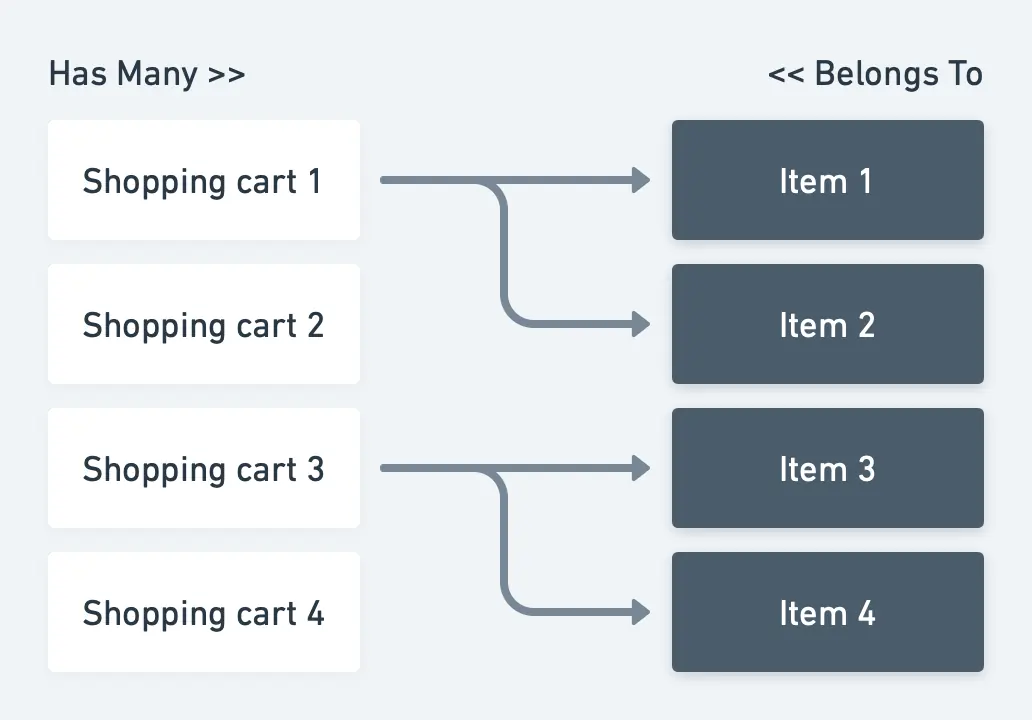
Erklärung der Beziehung: Die Item-Tabelle sollte die ShoppingCart-ID speichern.
Modelle: Wir benötigen also zwei Modelle: ShoppingCart und Item. Diese Modelle werden mit folgendem Code befüllt:
class ShoppingCart{
  /*
   * This function defines a relation with Item and tells that ID is stored in
   * Item model
   */
  public function items()
  {
    return $this->hasMany(Item::class);
  }
}
class Item{
  /*
   * This function defines a relation with Shopping Cart and tells that ID is stored in
   * this model
   */
  public function shoppingCart()
  {
    return $this->belongsTo(ShoppingCart::class);
  }
}
Datenbankmigration:
Schema::create('shopping_carts', function (Blueprint $table) {
  $table->id();
  # Some more columns which you will need
});
Schema::create('items', function (Blueprint $table) {
  $table->increments('id');
  # Some more columns which you will need
  $table->integer('user_id')->unsigned()->index()->nullable();
  $table->foreign('user_id')->references('id')->on('users');
});
Datensätze speichern: So erstellen Sie eine Beziehung zwischen dem ShoppingCart und den Items.
// Create multiple relations between Thief and Car.
$shoppingCart->items()->saveMany([$item1,$item2]);

// Or use the save() function for single model.
$shoppingCart-> items()->save($item1);
So erstellen Sie eine Beziehung zwischen dem Item und dem ShoppingCart.
$item->shoppingCart()->associate($shoppingCart)->save();
Polymorphe Eins-zu-viele-Beziehung
Fachliche Definition: Ein Benutzer kann mehrere Nachrichten hinterlassen. Der Support kann mehrere Nachrichten hinterlassen.
Definition aus Entwicklersicht: User hat viele Messages. Support hat viele Messages. Eine Message kann einem User oder dem Support gehören.
Diagramm
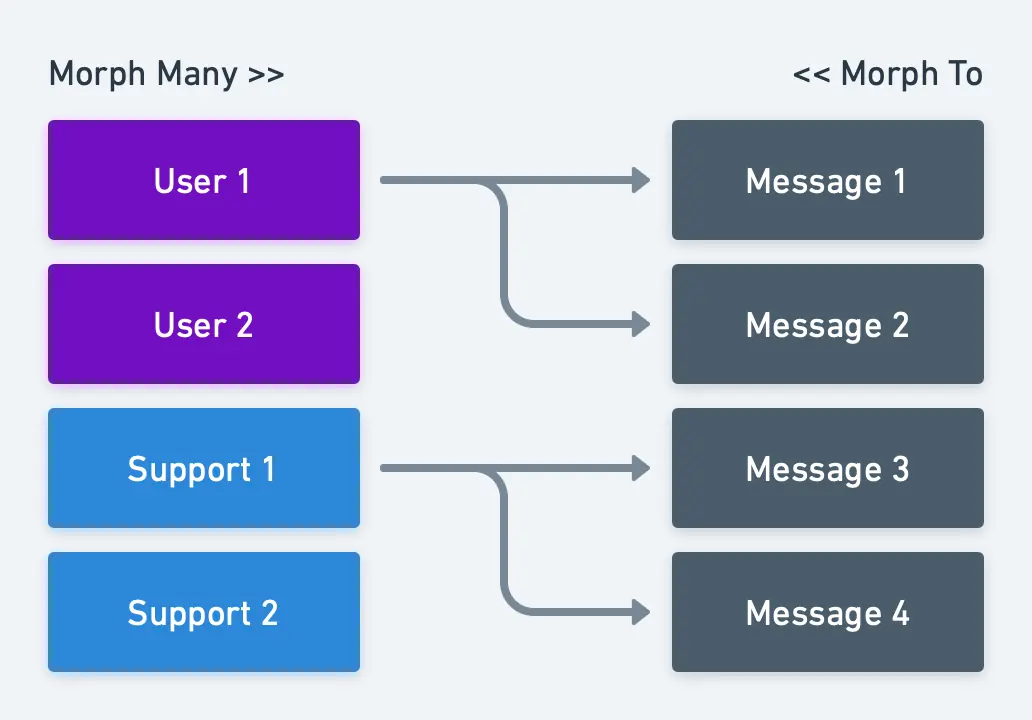
Erklärung der Beziehung: Die Message-Tabelle sollte die ID und den Typ des Absenders der Nachricht speichern.
Modelle: Wir benötigen also drei Modelle: User, Support und Message. Diese Modelle werden mit folgendem Code befüllt:
class User{
  /*
   * This function defines a relation with Message and tells that ID and type is stored in
   * Message model
   */
  public function messages()
  {
    return $this-> morphMany(Message::class, 'sender');
  }
}
class Support{
  /*
   * This function defines a relation with the Message and tells that ID is stored in
   * Message model
   */
  public function messages()
  {
    return $this-> morphMany(Message::class, 'sender');
  }
}
class Message{
  /*
   * This function defines a relation and tells that ID and type is stored in Message model
   */
  public function sender()
  {
    return $this->morphTo();
  }
}
Datenbankmigration:
Schema::create('users', function (Blueprint $table) {
  $table->id();
  # Some more columns which you will need
});
Schema::create('supports', function (Blueprint $table) {
  $table->id();
  # Some more columns which you will need
});
Schema::create('messages', function (Blueprint $table) {
  $table->id();
  # Some more columns which you will need
  $table->integer('sender_id')->unsigned()->index()->nullable();
  $table->string('sender_type')->nullable();
  // or use $table->morphs('sender'); instead of "sender_id" and "sender_type"
});
Datensätze speichern: Erstellen Sie eine Beziehung zwischen dem Absender (User/Support) und der Message.
// Create multiple relations.
$user->messages()->saveMany([$message1,$message2]);
$support->messages()->saveMany([$message1,$message2]);

// Or use the save() function for single model.
$user->messages()->save($message);
$support->messages()->save($message);
So erstellen Sie eine Beziehung zwischen Message und Absender.
$message->sender()->associate($user)->save();
$message-> sender()->associate($support)->save();
Viele-zu-viele-Beziehung
Fachliche Definition: Ein Artikel kann mehrere Tags haben.
Definition aus Entwicklersicht: Item hat viele Tags. Tag hat viele Items.
Diagramm
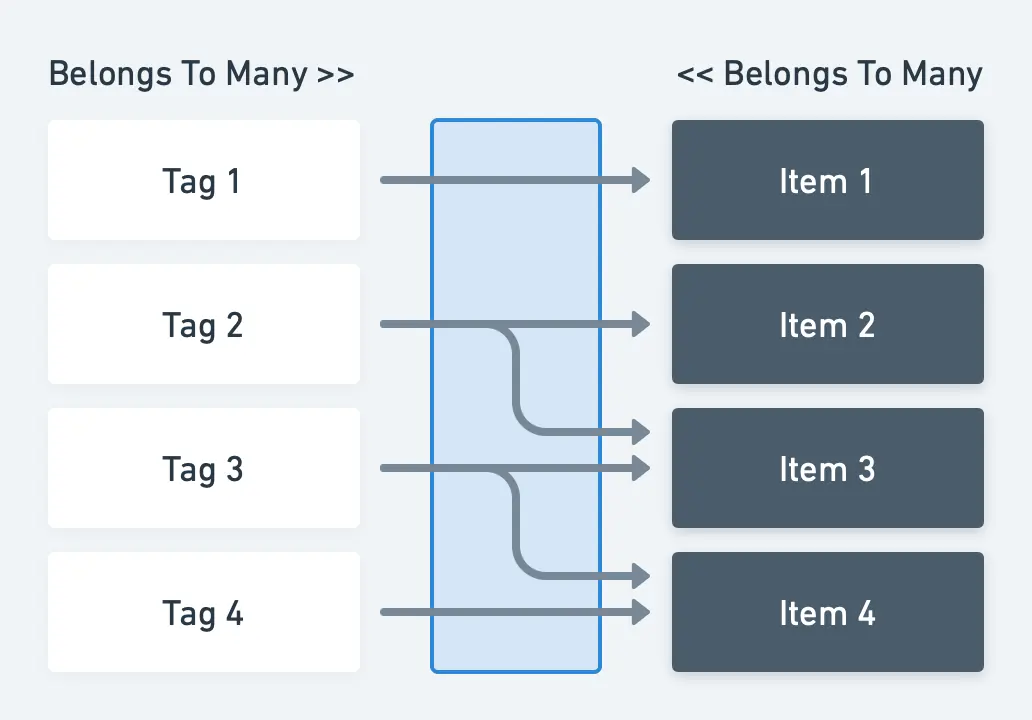
Erklärung der Beziehung: Da ein einzelnes Tag zu mehreren Items gehören kann und ein einzelnes Item mehrere Tags haben kann, benötigen wir eine dritte Tabelle (die sogenannte Pivot-Tabelle), die die Beziehung zwischen diesen beiden Modellen abbildet.
Modelle: Wir benötigen also zwei Modelle: Tag und Item. Diese Modelle werden mit folgendem Code befüllt:
class Tag{
  public function items()
  {
    return $this->belongsToMany(Items::class);
  }
}
class Item{
  public function tags()
  {
    return $this->belongsToMany(Tag::class);
  }
}
Datenbankmigration:
Schema::create('items', function (Blueprint $table) {
  $table->id();
  # Some more columns which you will need
});
Schema::create('tags', function (Blueprint $table) {
  $table->id();
  # Some more columns which you will need
});
Schema::create('item_tag', function (Blueprint $table) {
  $table->id();
  $table->integer('item_id')->unsigned()->index();
  $table->foreign('item_id')->references('id')->on('items')->onDelete('cascade');
  $table->integer('tag_id')->unsigned()->index();
  $table->foreign('tag_id')->references('id')->on('tags')->onDelete('cascade');
});
Datensätze speichern: Erstellen Sie eine Beziehung zwischen Item und Tag
$item->tags()->attach([$tag1->id,$tag2->id]);

// Or use the sync() function to prevent duplicated relations.
$item->tags()->sync([$tag1->id,$tag2->id]);
Oder erstellen Sie eine Beziehung zwischen Tag und Item
$tag->items()->attach([$item1->id,$item2->id]);

// Or use the sync() function to prevent duplicated relations.
$tag->items()->sync([$item1->id,$item2->id]);
Polymorphe Viele-zu-viele-Beziehung
Fachliche Definition: Produkte und Beiträge haben mehrere Tags
Definition aus Entwicklersicht: Product hat viele Tags. Post hat viele Tags. Ein Tag kann von vielen tagable-Modellen (Product und Post) verwendet werden
Diagramm
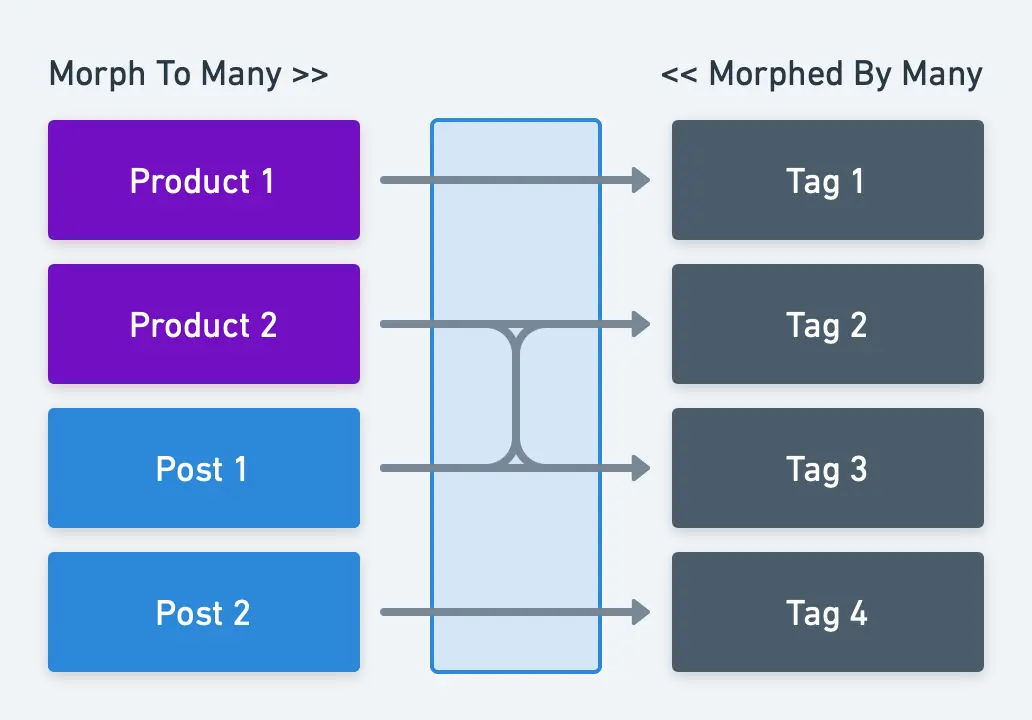
Erklärung der Beziehung: Da ein einzelnes Tag zu mehreren Posts oder Products gehören kann und ein einzelnes Product oder ein einzelner Post mehrere Tags haben kann, benötigen wir eine dritte Tabelle (die sogenannte Pivot-Tabelle), die die Beziehung zwischen diesen Modellen abbildet.
Modelle: Wir benötigen also drei Modelle: Product, Post und Tag. Diese Modelle werden mit folgendem Code befüllt:
class Product{
  public function tags()
  {
    return $this->morphToMany(Tag::class, 'tagable');
  }
}
class Post{
  public function tags()
  {
    return $this->morphToMany(Tag::class, 'tagable');
  }
}
class Tag{
  public function products()
  {
    return $this->morphedByMany(Product::class, 'tagable');
  }

  public function posts()
  {
    return $this->morphedByMany(Post::class, 'tagable');
  }
}
Datenbankmigration:
Schema::create('products', function (Blueprint $table) {
  $table->id();
  # Some more columns which you will need
});
Schema::create('posts', function (Blueprint $table) {
  $table->id();
  # Some more columns which you will need
});
Schema::create('tagables', function (Blueprint $table) {
  $table->id();
  $table->integer('tagable_id')->unsigned()->index();
  $table->string('tagable_type');
  // or use $table->morphs(‘tagable’); instead of "tagable_id" and "tagable_type"

  $table->integer('tag_id')->unsigned()->index();
  $table->foreign('tag_id')->references('id')->on('tags')->onDelete('cascade');
});
Datensätze speichern: Erstellen Sie eine Beziehung zwischen dem tagable-Modell (Product oder Post) und Tag.
$product->tags()->saveMany([$tag1, $tag2]);
$post->tags()->saveMany([$tag1, $tag2]);

// Or use the save() function for single model.
$product->tags()->save($tag1);
$post->tags()->save($tag1);
Oder erstellen Sie eine Beziehung zwischen Tag und dem tagable-Modell.
$tag->products()->attach([$product1->id,$product2->id]);
$tag->posts()->attach([$post1->id,$post2->id]);

// Or use the sync() function to prevent duplicated relations.
$tag->products()->sync([$product1->id,$product2->id]);
$tag->posts()->sync([$post1->id,$post2->id]);