
Шпаргалка по связям Eloquent
Связь «один к одному»
Бизнес-определение: У пользователя есть корзина покупок.
Определение с точки зрения разработчика: У пользователя есть одна корзина покупок. Корзина покупок принадлежит одному пользователю.
Диаграмма
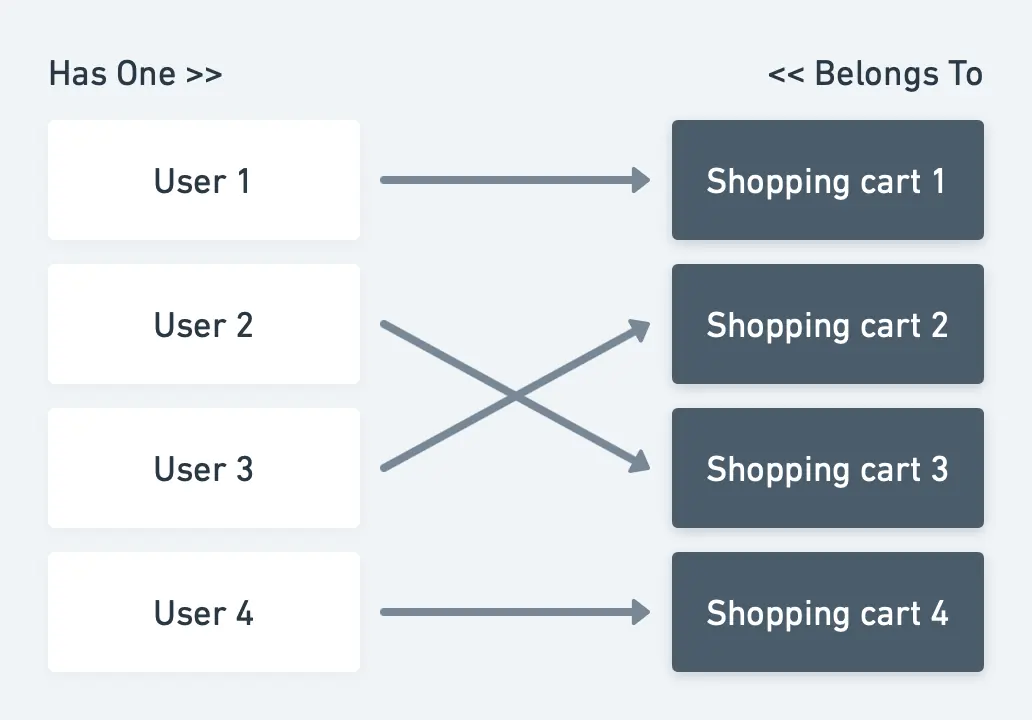 Пояснение связи:
Таблица корзины покупок должна хранить ID пользователя.
Пояснение связи:
Таблица корзины покупок должна хранить ID пользователя.
Модели: Итак, нам нужны две модели: User и ShoppingCart. В эти модели нужно добавить следующий код:
class User{
  /*
   * This function defines a relation with Shopping Cart and tells that ID is stored in
   * ShoppingCart model
   */
  public function shoppingCart()
  {
    return $this->hasOne(ShoppingCart::class);
  }
}
class ShoppingCart{
  /*
   * This function defines a relation with the User and tells that ID is stored in
   * this model
   */
  public function user()
  {
    return $this->belongsTo(User::class);
  }
}
Миграция базы данных:
Schema::create('users', function (Blueprint $table) {
  $table->id();
  # Some more columns which you will need
});
Schema::create('shopping_carts', function (Blueprint $table) {
  $table->increments('id');
  # Some more columns which you will need
  $table->integer('user_id')->unsigned()->index()->nullable();
  $table->foreign('user_id')->references('id')->on('users');
});
Сохранение записей: Чтобы создать связь между User и ShoppingCart.
$user->shoppingCart()->save($shoppingCart);
Чтобы создать связь между ShoppingCart и User.
$shoppingCart->user()->associate($user)->save();
Связь «один ко многим»
Бизнес-определение: Пользователь должен иметь возможность добавлять в корзину покупок несколько товаров.
Определение с точки зрения разработчика: У корзины покупок есть несколько товаров.
Диаграмма
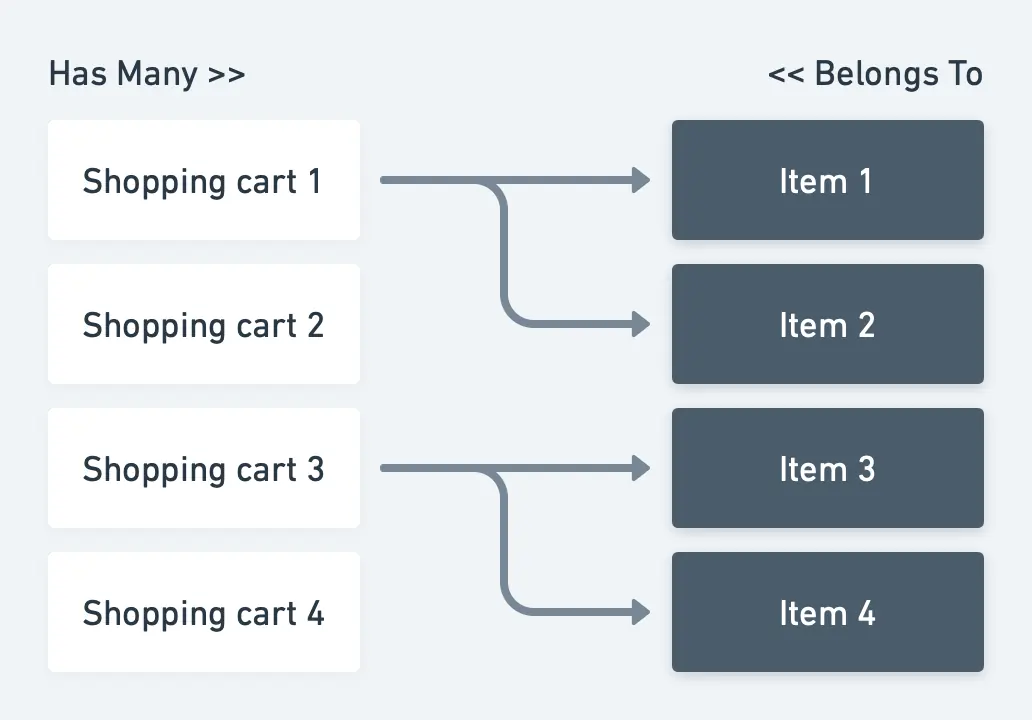
Пояснение связи: Таблица товаров должна хранить ID корзины покупок.
Модели: Итак, нам нужны две модели: ShoppingCart и Item. В эти модели нужно добавить следующий код:
class ShoppingCart{
  /*
   * This function defines a relation with Item and tells that ID is stored in
   * Item model
   */
  public function items()
  {
    return $this->hasMany(Item::class);
  }
}
class Item{
  /*
   * This function defines a relation with Shopping Cart and tells that ID is stored in
   * this model
   */
  public function shoppingCart()
  {
    return $this->belongsTo(ShoppingCart::class);
  }
}
Миграция базы данных:
Schema::create('shopping_carts', function (Blueprint $table) {
  $table->id();
  # Some more columns which you will need
});
Schema::create('items', function (Blueprint $table) {
  $table->increments('id');
  # Some more columns which you will need
  $table->integer('user_id')->unsigned()->index()->nullable();
  $table->foreign('user_id')->references('id')->on('users');
});
Сохранение записей: Чтобы создать связь между корзиной покупок и товарами.
// Create multiple relations between Thief and Car.
$shoppingCart->items()->saveMany([$item1,$item2]);

// Or use the save() function for single model.
$shoppingCart-> items()->save($item1);
Чтобы создать связь между товаром и корзиной покупок.
$item->shoppingCart()->associate($shoppingCart)->save();
Полиморфная связь «один ко многим»
Бизнес-определение: Пользователь может оставлять несколько сообщений. Поддержка может оставлять несколько сообщений.
Определение с точки зрения разработчика: У пользователя много сообщений. У поддержки много сообщений. Сообщение может принадлежать пользователю или поддержке.
Диаграмма
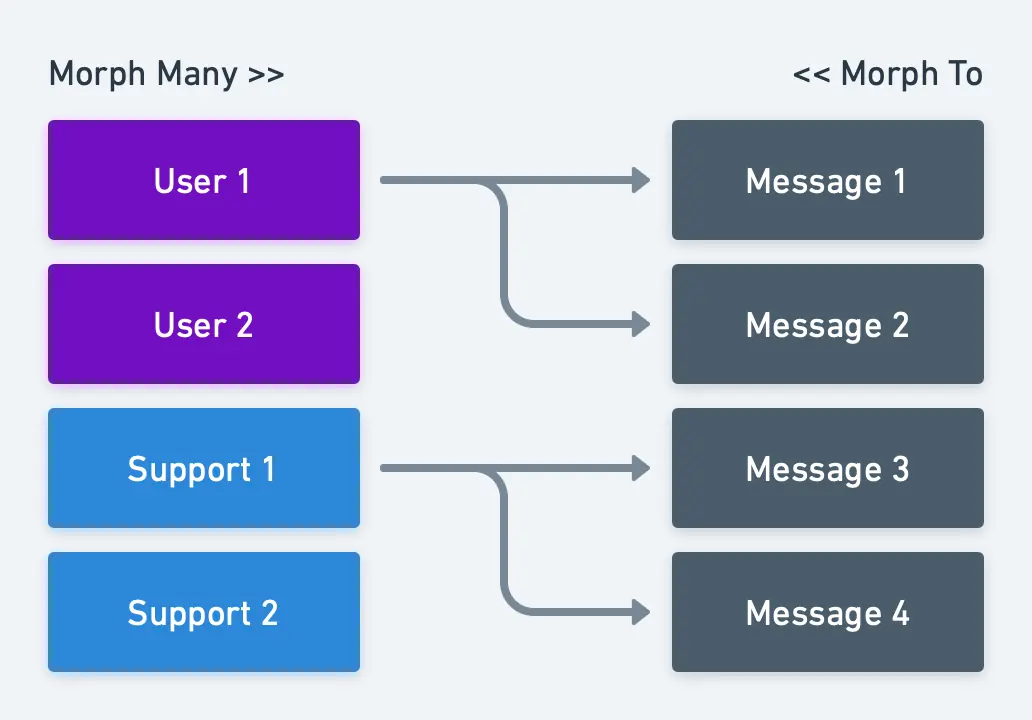
Пояснение связи: Таблица сообщений должна хранить ID и тип отправителя сообщения.
Модели: Итак, нам нужны три модели: User, Support и Message. В эти модели нужно добавить следующий код:
class User{
  /*
   * This function defines a relation with Message and tells that ID and type is stored in
   * Message model
   */
  public function messages()
  {
    return $this-> morphMany(Message::class, 'sender');
  }
}
class Support{
  /*
   * This function defines a relation with the Message and tells that ID is stored in
   * Message model
   */
  public function messages()
  {
    return $this-> morphMany(Message::class, 'sender');
  }
}
class Message{
  /*
   * This function defines a relation and tells that ID and type is stored in Message model
   */
  public function sender()
  {
    return $this->morphTo();
  }
}
Миграция базы данных:
Schema::create('users', function (Blueprint $table) {
  $table->id();
  # Some more columns which you will need
});
Schema::create('supports', function (Blueprint $table) {
  $table->id();
  # Some more columns which you will need
});
Schema::create('messages', function (Blueprint $table) {
  $table->id();
  # Some more columns which you will need
  $table->integer('sender_id')->unsigned()->index()->nullable();
  $table->string('sender_type')->nullable();
  // or use $table->morphs('sender'); instead of "sender_id" and "sender_type"
});
Сохранение записей: Создайте связь между отправителем (User/Support) и Message.
// Create multiple relations.
$user->messages()->saveMany([$message1,$message2]);
$support->messages()->saveMany([$message1,$message2]);

// Or use the save() function for single model.
$user->messages()->save($message);
$support->messages()->save($message);
Чтобы создать связь между Message и отправителем.
$message->sender()->associate($user)->save();
$message-> sender()->associate($support)->save();
Связь «многие ко многим»
Бизнес-определение: Товар может иметь несколько тегов.
Определение с точки зрения разработчика: У товара много тегов. У тега много товаров.
Диаграмма
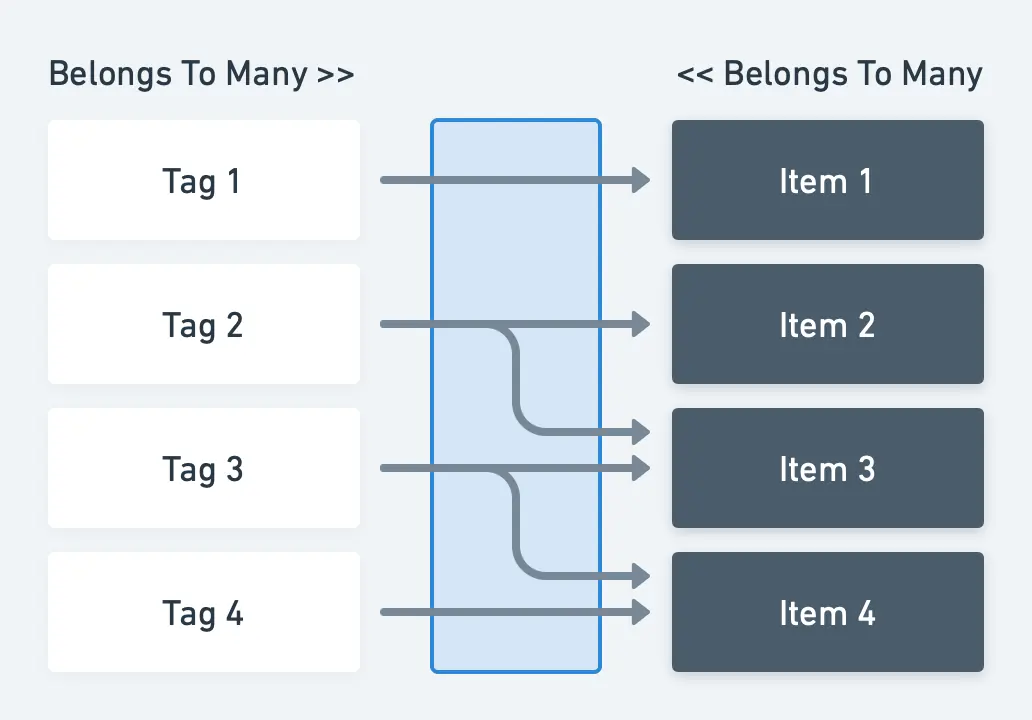
Пояснение связи: Поскольку один тег может принадлежать нескольким товарам, а один товар может иметь несколько тегов, нам нужна третья таблица (так называемая Pivot-таблица), в которой будет храниться связь между этими двумя моделями.
Модели: Итак, нам нужны две модели: Tag и Item. В эти модели нужно добавить следующий код:
class Tag{
  public function items()
  {
    return $this->belongsToMany(Items::class);
  }
}
class Item{
  public function tags()
  {
    return $this->belongsToMany(Tag::class);
  }
}
Миграция базы данных:
Schema::create('items', function (Blueprint $table) {
  $table->id();
  # Some more columns which you will need
});
Schema::create('tags', function (Blueprint $table) {
  $table->id();
  # Some more columns which you will need
});
Schema::create('item_tag', function (Blueprint $table) {
  $table->id();
  $table->integer('item_id')->unsigned()->index();
  $table->foreign('item_id')->references('id')->on('items')->onDelete('cascade');
  $table->integer('tag_id')->unsigned()->index();
  $table->foreign('tag_id')->references('id')->on('tags')->onDelete('cascade');
});
Сохранение записей: Создайте связь между Item и Tag
$item->tags()->attach([$tag1->id,$tag2->id]);

// Or use the sync() function to prevent duplicated relations.
$item->tags()->sync([$tag1->id,$tag2->id]);
Или создайте связь между Tag и Item
$tag->items()->attach([$item1->id,$item2->id]);

// Or use the sync() function to prevent duplicated relations.
$tag->items()->sync([$item1->id,$item2->id]);
Полиморфная связь «многие ко многим»
Бизнес-определение: Товары и записи блога имеют несколько тегов
Определение с точки зрения разработчика: У товара много тегов. У записи много тегов. Тег может использоваться многими tagable-сущностями (Product и Post)
Диаграмма
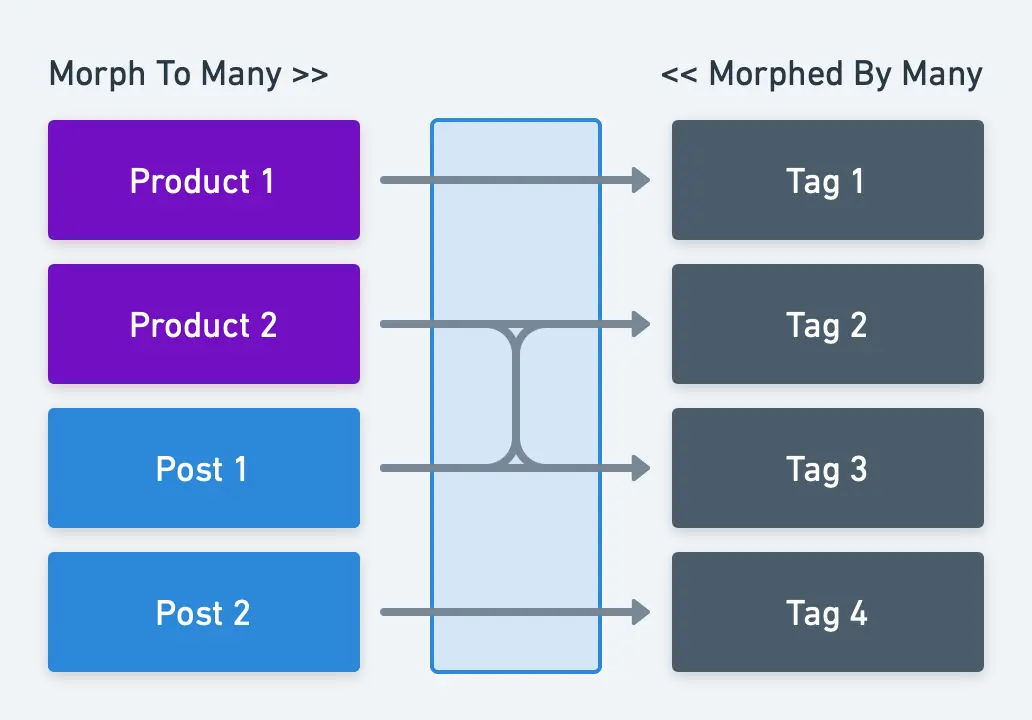
Пояснение связи: Поскольку один тег может принадлежать нескольким записям или товарам, а один товар или запись может иметь несколько тегов, нам нужна третья таблица (так называемая Pivot-таблица), в которой будет храниться связь между этими моделями.
Модели: Итак, нам нужны три модели: Product, Post и Tag. В эти модели нужно добавить следующий код:
class Product{
  public function tags()
  {
    return $this->morphToMany(Tag::class, 'tagable');
  }
}
class Post{
  public function tags()
  {
    return $this->morphToMany(Tag::class, 'tagable');
  }
}
class Tag{
  public function products()
  {
    return $this->morphedByMany(Product::class, 'tagable');
  }

  public function posts()
  {
    return $this->morphedByMany(Post::class, 'tagable');
  }
}
Миграция базы данных:
Schema::create('products', function (Blueprint $table) {
  $table->id();
  # Some more columns which you will need
});
Schema::create('posts', function (Blueprint $table) {
  $table->id();
  # Some more columns which you will need
});
Schema::create('tagables', function (Blueprint $table) {
  $table->id();
  $table->integer('tagable_id')->unsigned()->index();
  $table->string('tagable_type');
  // or use $table->morphs(‘tagable’); instead of "tagable_id" and "tagable_type"

  $table->integer('tag_id')->unsigned()->index();
  $table->foreign('tag_id')->references('id')->on('tags')->onDelete('cascade');
});
Сохранение записей: Создайте связь между tagable-сущностью (Product или Post) и Tag.
$product->tags()->saveMany([$tag1, $tag2]);
$post->tags()->saveMany([$tag1, $tag2]);

// Or use the save() function for single model.
$product->tags()->save($tag1);
$post->tags()->save($tag1);
Или создайте связь между Tag и tagable-сущностью.
$tag->products()->attach([$product1->id,$product2->id]);
$tag->posts()->attach([$post1->id,$post2->id]);

// Or use the sync() function to prevent duplicated relations.
$tag->products()->sync([$product1->id,$product2->id]);
$tag->posts()->sync([$post1->id,$post2->id]);